

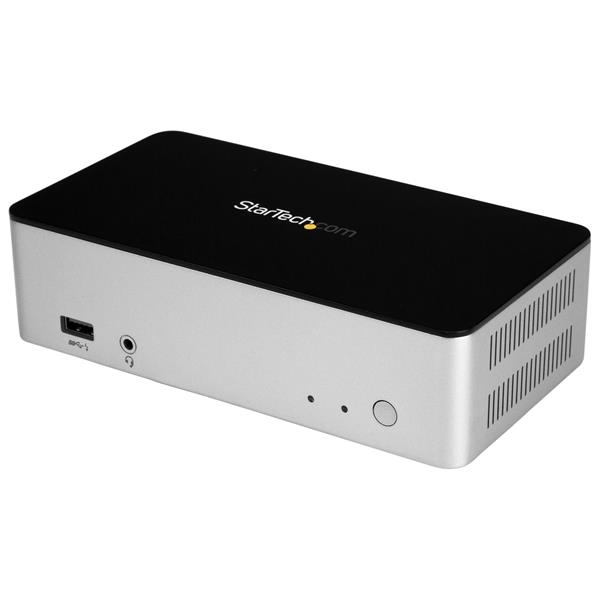
Startech Dual Monitor Usb C Dock - 2.5in Sata Ssd/hdd Hard Drive Bay - Laptop Docking Station
| SKU: | 256733 |
|---|---|
| MPN: | MST30C2HDPPD Link |
| Manufacturer: | https://www.startech.com/ |
| Brand: | Startech |
| Warranty: | 1 Year Manufacturer's return to base |
| Availability: |
In stock |
| Fright Estimate |

Description
This dual-monitor USB-C™ docking station adds valuable data storage and backup to your Windows laptop, and makes it easy to create a multi-monitor workstation through support for DP Alt Mode and DisplayPort Multi-Stream Transport (MST).
The USB-C dock provides a versatile way to connect to two DisplayPort monitors, a wired network and three USB 3.0 devices, while housing a 2.5” HDD or SSD for added storage or backup, all through a single USB-C cable. Plus, with Power Delivery support, you can power and charge your laptop as you work.
Add data storage and backup
Featuring a built-in 2.5” SATA SSD/HDD drive bay, this docking station gives you the added advantage of external data storage and backup, reducing the number of devices on your desktop. You can consolidate your peripherals, including external storage, with just one connection to your laptop. This reduces clutter in your workspace and simplifies workflow, making it easier to perform routine tasks like data offloads.
The 2.5" drive bay supports SATA I, II, and III. It’s ideal for creative professionals, IT executives, engineers, business executives and other professionals requiring high-performance functionality and external storage and backup, with Windows Backup, macOS Time Machine or other backup software. And, if you want to add further external storage, the dock has three USB 3.0 ports available.
Connect just one adapter to power the dock and your laptop
This premium laptop dock capitalizes on the full potential of USB Type-C™, which simultaneously transfers power, video, and data.
The docking station supports USB Power Delivery, providing up to 60 watts of power, through the 100W power adapter included. This means you can power and charge your laptop while it's docked, through its USB-C port, and cut clutter at your workstation. Plus, you don’t need to carry or remember an extra power adapter when you’re traveling to or from the office.
Take advantage of versatile video output
This dual-monitor docking station replicates the high performance of a full-size workstation, with DP Alt Mode and MST support providing single, mirror and extended display mode functionality. The USB-C docking station supports 4K Ultra HD resolution (providing the connected DisplayPort display supports it).
With this versatile dock, you can connect:
- 2x DisplayPort display at 1920 x 1200 resolution (60Hz)
-
1x DisplayPort display at 3840 x 2160 resolution (30Hz)
Note: Multi-display and dual-display configurations are only supported in Windows operating systems that support MST.
The MST30C2HDPPD is backed by a StarTech.com 3-year warranty and free lifetime technical support.
Notes:
- Ensure your laptop’s drivers, firmware, and operating system are up to date prior to using the docking station.
- Video output capabilities are dependent on the video card and hardware specification of your connected laptop. Certain video cards have limited MST support, while some monitors will also limit the available resolution.
- Not all USB-C ports support the full functionality of the USB Type-C standard. Ensure that your laptop USB-C port supports DP alt mode, as well as USB Power Delivery.
- Not all Thunderbolt 3 USB-C ports support the full functionality of the Thunderbolt 3 standard. Ensure that your laptop Thunderbolt 3 port supports USB Power Delivery.
- macOS does not support MST.
Specifications
| Hardware | |
| Displays Supported | 2 |
| Fast-Charge Port(s) | Yes |
| Industry Standards | USB Power Delivery Specification Rev. 2.0 USB Battery Charging Specification Rev. 1.2 DisplayPort 1.2 with MST IEEE 802.3, IEEE 802.3u, IEEE 802.3ab USB 3.0 - Backward compatible with USB 2.0 and 1.1 |
| Packaging Information | |
| Shipping (Package) Weight | 1.9 kg [4.2 lb] |
| Performance | |
| 4Kn Support | Yes |
| Maximum Data Transfer Rate | 5 Gbps (USB 3.0) 2 Gbps (Ethernet; Full-Duplex) |
| Maximum Digital Resolutions | 2x DisplayPort display at 1920 x 1200 resolution (60Hz) 1x DisplayPort display at 3840 x 2160 resolution (30Hz) |
| S.M.A.R.T. Support | Yes |
| TRIM Support | Yes |
| Type and Rate | USB 3.0 - 5 Gbit/s |
| UASP Support | Yes |
| Physical Characteristics | |
| Cable Length | 1000 mm [39.4 in] |
| Color | Black & Silver |
| Enclosure Type | Plastic |
| Product Height | 46 mm [1.8 in] |
| Product Length | 170 mm [6.7 in] |
| Product Weight | 321 g [11.3 oz] |
| Product Width | 90 mm [3.5 in] |
| Power | |
| Center Tip Polarity | Positive |
| Input Current | 2 A |
| Input Voltage | 100 ~ 240 AC |
| Output Current | 5 A |
| Output Voltage | 20V DC |
| Plug Type | N |
| Power Consumption (In Watts) | 100 |
| Power Delivery | 60W |
| Power Source | AC Adapter Included |
| Software | |
| OS Compatibility | Windows? 7, 8, 8.1, 10 Mac OS 10.11 to 10.13* *MacOS does not support MST |
| Special Notes / Requirements | |
| Note | A 4K-capable DisplayPort display is required to achieve 4Kx2K resolution |
| For a dual-monitor configuration the host laptop must support MST | |
| If you are connecting multiple DisplayPort monitors in a daisy chain through the dock's DisplayPort connection, the monitors must support DisplayPort 1.2 and MST | |
| Not all USB-C ports support the full functionality of the USB Type-C standard. Ensure that your host USB-C port supports USB Power Delivery 2.0 and DP alt mode. | |
| USB 3.0 is also known as USB 3.1 Gen 1; this connectivity standard offers speeds up to 5Gbps | |
| Hardware | |
| Chipset ID | VIA/VLI - VL813 MegaChips - STDP4320 ASMedia - ASM1153E Realtek - RTL8153 C-Media - CM6533 Texas Instruments - TPS65986 |
| Bus Type | USB-C |
| 4K Support | Yes |
| Environmental | |
| Storage Temperature | -40?C to 70?C (-40?F to 158?F) |
| Operating Temperature | 0?C to 60?C (32?F to 140?F) |
| Humidity | 0%~95% RH (Non-condensing) |
| Connector(s) | |
| Connector Type(s) | USB Type-C (24 pin) USB 3.0 Female |
| USB Type-A (9 pin) USB 3.0 Female | |
| USB 3.0 A (Fast-Charge, 9 pin, SuperSpeed) Female | |
| RJ-45 Female | |
| DisplayPort (20 pin) Female | |
| 3.5 mm Mini-Jack (4 Position) Female | |
| Special Notes / Requirements | |
| Note | Video output capabilities are dependent on the video card and hardware specifications of your connected host laptop. Certain video cards have limited MST or video support, while some monitors will also limit the available resolution. |
| System and Cable Requirements | A host laptop with an available USB-C port (to ensure full adapter functionality, the host USB-C port must support USB Power Delivery 2.0 and DP alt mode) |
| What's in the Box | |
| Included in Package | 1 m USB-C cable |
| docking station | |
| hard-drive mounting screws | |
| Quick-start guide | |
| universal power adapter (NA/JP, UK, EU, ANZ) | |
Vendor Info
| Marketing Text | This dual-monitor USB-C docking station adds valuable data storage and backup to your Windows laptop, and makes it easy to create a multi-monitor workstation through support for DP Alt Mode and DisplayPort Multi-Stream Transport (MST). |
| PI Date | Jan 2018 |
| Brand Name | Startech |
| Manufacturer Web Site | http://www.startech.com |
| Product Type | USB Dock |
| Depth (mm) | 170.0 |
| Height (mm) | 46.0 |
| Width (mm) | 90.0 |
| Weight (Grams) | 321.0 |
| Colour | Black and Silver |
| Operating Temperature | 0 to 60°C |
| Other Features | * Turn your USB-C laptop into a dual-video workstation with MST single, mirror and extended mode support * Displays Supported: 2 |
| System Requirements | * A host laptop with an available USB-C port |
| Package Contents | * 1 - docking station * 1 - 1 m USB-C cable * 4 - hard-drive mounting screws * 1 - Quick-start guide |
| Warranty Information | 3 Years |
