

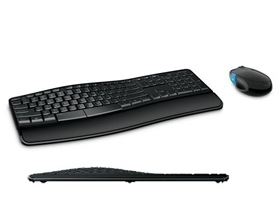
Microsoft Ms Sculpt Comfort Desktop Usb Windows 7/ 8/ Rt Bluetrack Black (retail) L3v-00027
| SKU: | 162209 |
|---|---|
| MPN: | L3V-00027 |
| Manufacturer: | http://www.microsoft.com/en-us/default.aspx |
| Brand: | Microsoft |
| Availability: |
In stock |
| Fright Estimate |

Description
Sculpt Comfort Desktop
Part Number: L3V-00027
Overview
Sculpt Comfort Desktop
Product Dimensions
Maximum comfort, customized for you
With its contoured design, customizable features that easily adjust to your
needs, and a specially designed, right-handed mouse, Sculpt Comfort Desktop
transforms the way you use a keyboard and mouse. It helps you keep your wrists
in a neutral position, while providing functionality and shortcuts that improve
typing efficiency.
Modern modular design
The sleek design and comfort curve layout keep keys within easy reach, while
straightening wrists with ergonomic palm support that protects against
inflammation and repetitive stress injuries. The split spacebar offers new
backspace functionality to help you make the most of your keystrokes. Tight
workspace? Sculpt Comfort Desktop can be easily customized to save space, and
offer a more compact look, by detaching the palm rest.
Windows 8 integration
Sculpt Comfort Desktop perfectly integrates with Windows 8. The keyboard hotkeys
provide shortcuts to the most commonly used keyboard functions. The Windows
Touch tab, a touch-sensitive strip located on the side of the mouse, enables you
to take advantage of swiping functionality as you navigate the Start screen.
Details
Contoured for comfort
Contoured design promotes a natural wrist position and puts keys within easy
reach.
Detachable palm rest
Detachable palm rest can be removed for a sleek, compact look.Work in the
position that's most comfortable for you with detachable palm rest and
adjustable keyboard legs.
Split spacebar with backspace functionality
Split spacebar with backspace functionality is designed to improve typing
efficiency.
Four-Way Scrolling
Scroll left, right, front and back. Quickly navigate all of your projects with
speed and efficiency.
Windows touch tab
Optimized for Windows 8, press the centre of the blue strip to switch between
your current app and the start screen. Swipe up on the blue strip to cycle
through open modern apps, swipe down to reveal all the open apps and select the
one you want. Also works in Windows 7: press to go to the Start menu, and swipe
up or down to move forward and backward in your browser.
Windows 8 Shortcut Keys
Provide convenient access to commonly used Windows 8 functions.
BlueTrack Technology
BlueTrack technology works on virtually any surface in your home or office.
System Requirements
Computer/Operating System
Requires a PC that meets the requirements for and has installed one of these
operating systems: Windows 8, Windows RT, Windows 7
Hard Drive
150 MB Hard Drive
Other
Keyboard: 2 AAA alkaline batteries (included)
Mouse: 2 AA alkaline batteries (included)
USB
